
For millions of people, WhatsApp is not only a messaging app it is part of everyday life in Pakistan. It is where university groups share assignments, families exchange updates, small businesses receive orders, offices coordinate work, and friends send endless voice notes. Yet many people still use WhatsApp only for basic chats, calls, photos, and status updates.
The latest WhatsApp hidden features Pakistani users should know about can make the app more private, easier to use, and better suited to local needs. From protecting sensitive chats on a shared phone to reading long voice notes in a noisy market, these tools can save time and improve privacy. Some features may depend on your app version, language, device, and regional rollout, so update WhatsApp from the official app store before looking for them.
1. Use a WhatsApp proxy during connection problems
One of the most useful WhatsApp privacy features is the built-in proxy setting. A proxy can help you connect to WhatsApp when the normal network connection is disrupted, restricted, or not working correctly.

This can be helpful during local connectivity issues, ISP-level problems, or temporary service disruptions. Instead of immediately downloading an unknown VPN application, users can try WhatsApp’s own proxy option first.
How to set up a proxy on WhatsApp
-
Open WhatsApp and go to Settings.
-
Select Storage and Data.
-
Tap Proxy.
-
Choose Set Up Proxy.
-
Enter a proxy host or IP address from a trustworthy source.
-
Save the settings and check whether the connection is successful.

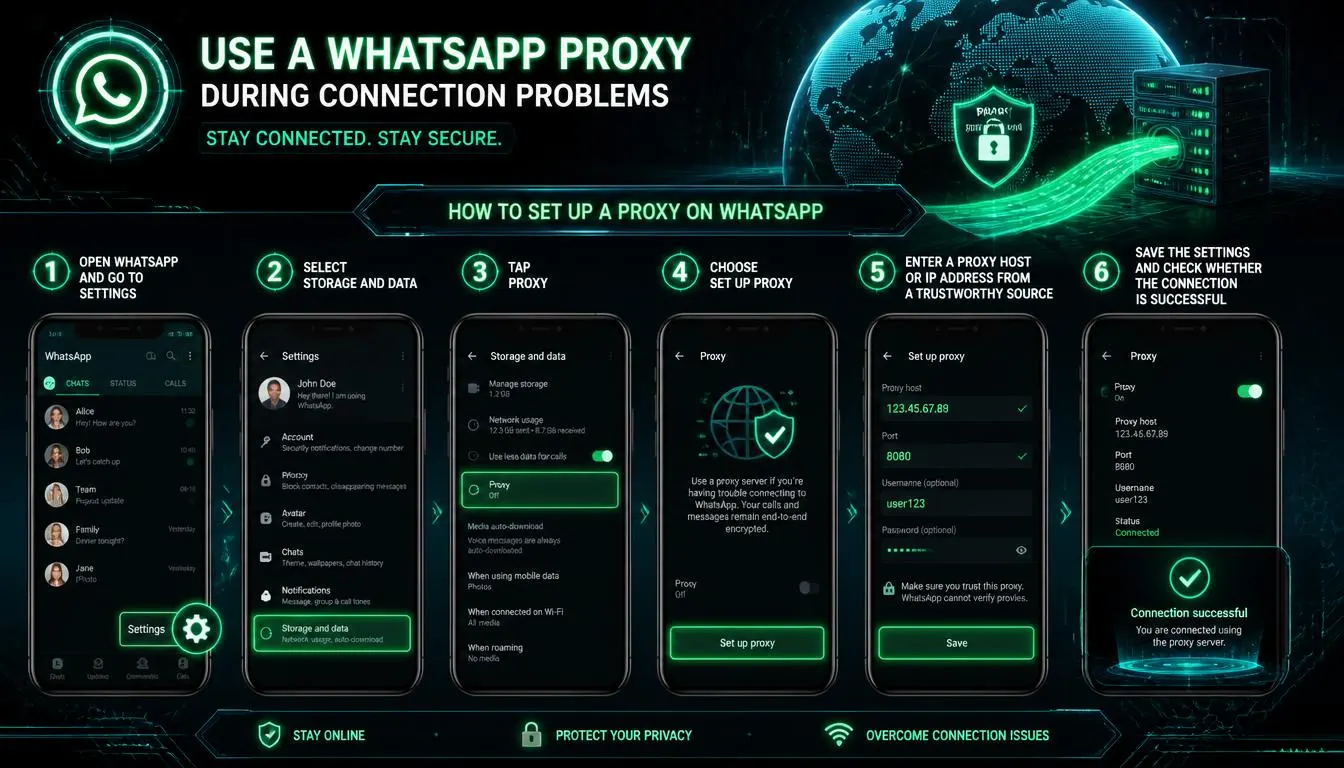
WhatsApp states that messages remain protected with end-to-end encryption when using a proxy. However, users should only use a proxy address from a source they trust and should avoid random links or unverified proxy lists shared on social media.
2. Read long voice notes with voice message transcripts
Voice notes are extremely popular in Pakistan. They are convenient when typing Urdu, Roman Urdu, or detailed explanations takes too long. But they can become frustrating when someone sends a four-minute audio message while you are in class, at work, in public transport, or sitting with family.
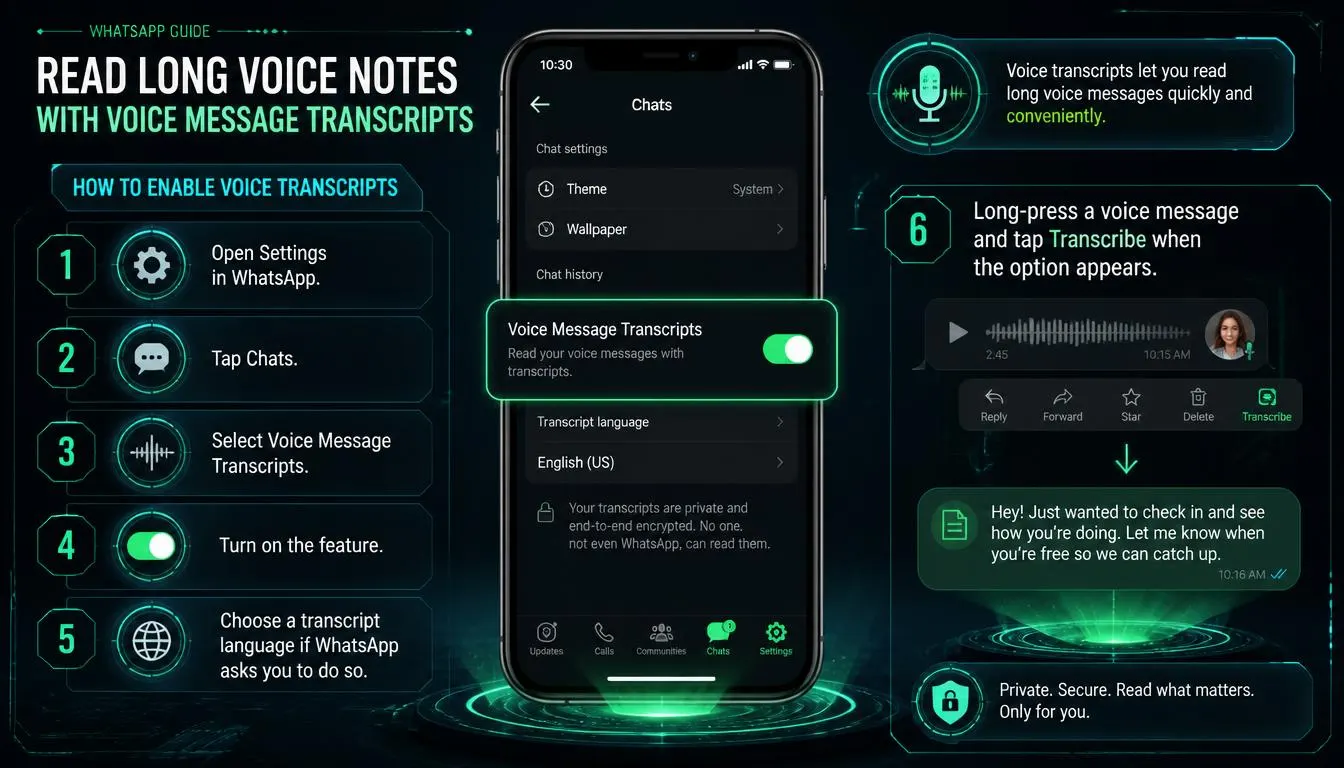
WhatsApp voice message transcripts turn supported voice messages into readable text. This is one of the best WhatsApp hidden features Pakistani users can activate when listening to audio is not practical.
How to enable voice transcripts
-
Open Settings in WhatsApp.
-
Tap Chats.
-
Select Voice Message Transcripts.
-
Turn on the feature.
-
Choose a transcript language if WhatsApp asks you to do so.
-
Long-press a voice message and tap Transcribe when the option appears.
WhatsApp says these transcripts are generated on the user’s device, so WhatsApp cannot hear or read the personal voice message while creating the transcript.
Transcript accuracy can vary with background noise, speaking speed, mixed languages, strong accents, and Roman Urdu. Still, it is useful for understanding the main point of a long message without playing it aloud.
3. Hide private conversations with Chat Lock Secret Code
Many Pakistani households share devices with siblings, children, spouses, or relatives. Even when your phone is locked, someone may borrow it to make a call, use the camera, or check a message. That makes WhatsApp Chat Lock particularly useful.
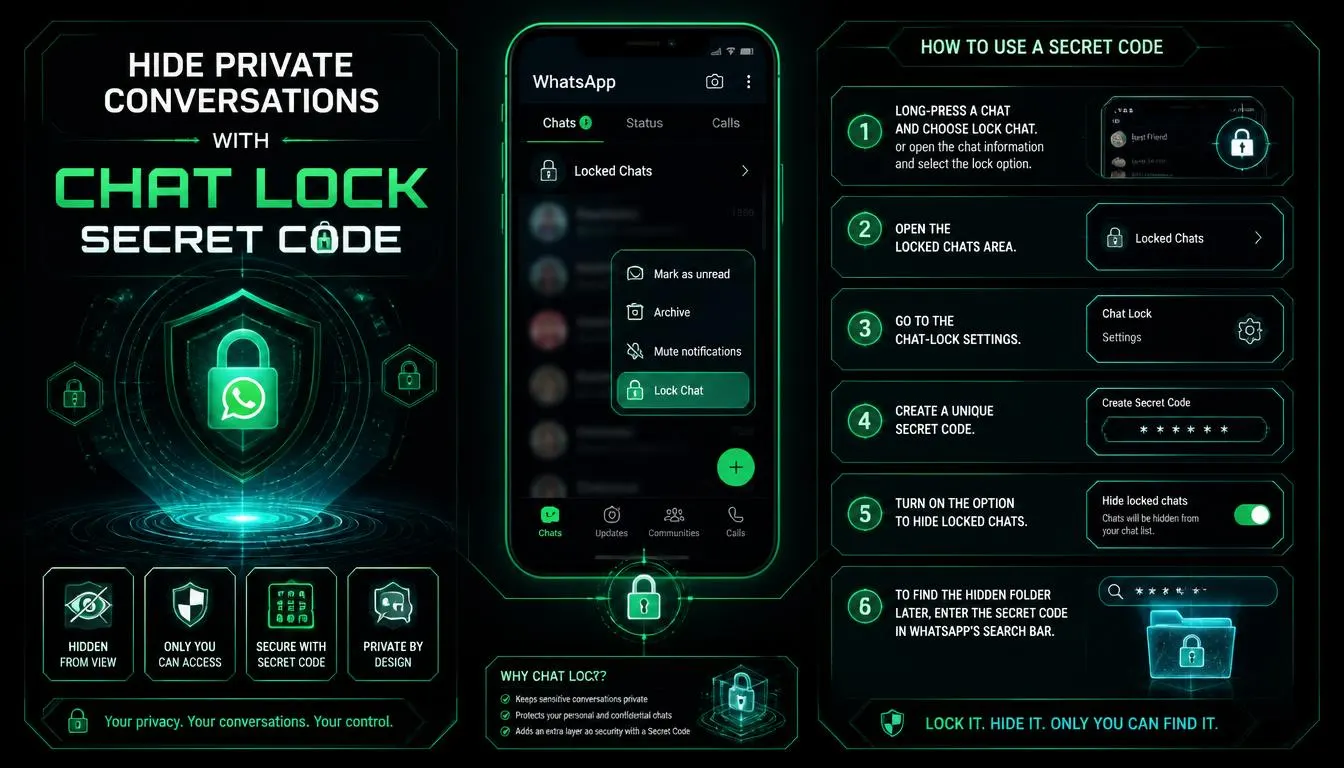
Chat Lock adds another layer of protection to selected conversations. Locked chats are separated from the regular inbox and require your phone password, fingerprint, Face ID, or another approved device-authentication method. WhatsApp also hides the locked chat’s content in notifications.
The stronger option is the Secret Code feature. It lets you hide the entire Locked Chats folder so it does not appear openly at the top of the chat list.
How to use a Secret Code
-
Long-press a chat and choose Lock Chat, or open the chat information and select the lock option.
-
Open the Locked Chats area.
-
Go to the chat-lock settings.
-
Create a unique Secret Code.
-
Turn on the option to hide locked chats.
-
To find the hidden folder later, enter the Secret Code in WhatsApp’s search bar.
WhatsApp introduced Secret Code specifically to make locked chats harder to discover when another person has access to your phone.
Do not use an obvious code such as your date of birth, mobile number, or a password that family members already know.
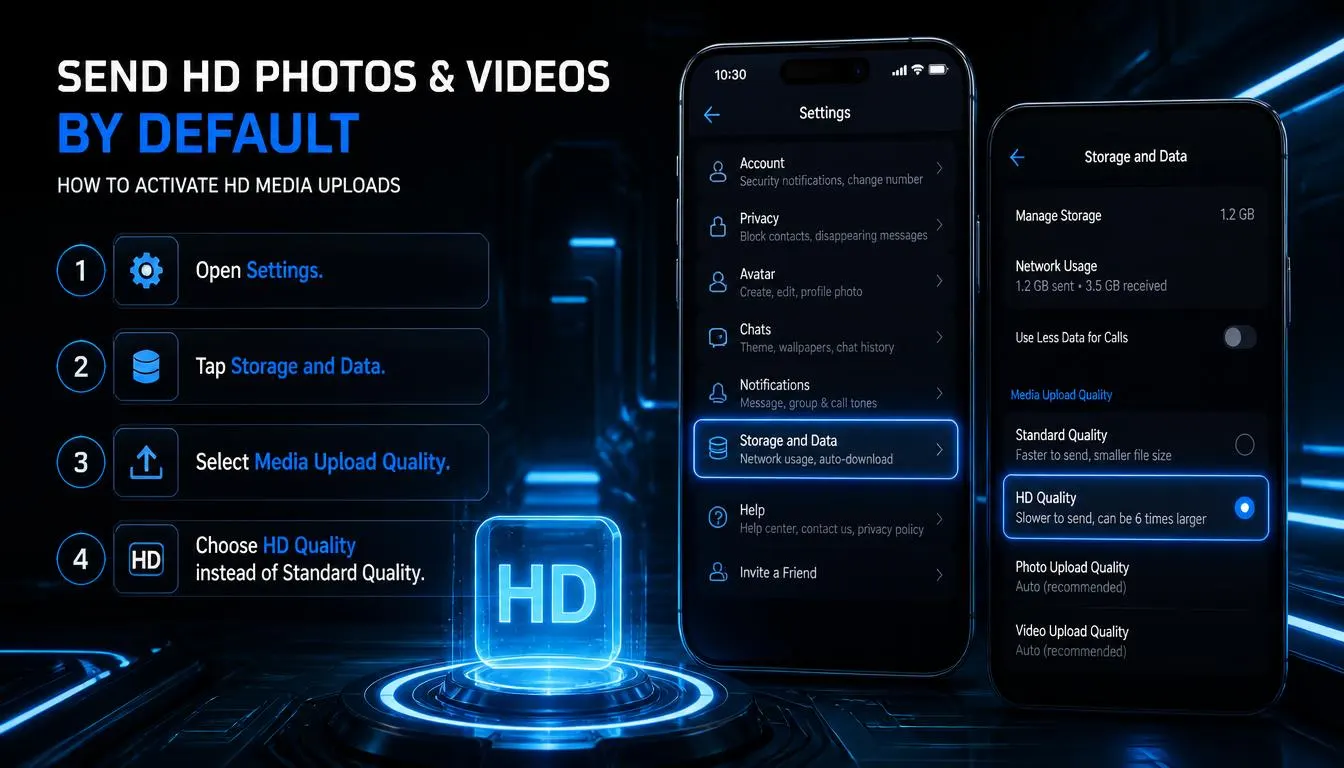
4. Send HD photos and videos by default
Blurry images are a common WhatsApp problem. Wedding photographs, product pictures for customers, university documents, receipts, property images, and screenshots often lose quality after being sent through the app.
WhatsApp allows you to change media upload settings so that photos and videos are sent in HD quality by default. This is especially valuable for small businesses that sell through WhatsApp, freelance designers sharing drafts, and students sending readable scans.
How to activate HD media uploads
-
Open Settings.
-
Tap Storage and Data.
-
Select Media Upload Quality.
-
Choose HD Quality instead of Standard Quality.
HD media is clearer than standard media, but it uses more data and can take longer to upload. If you use a limited mobile-data package, consider keeping HD uploads for Wi-Fi or for important files only.
For documents that must remain exactly unchanged, such as PDFs, official forms, or high-resolution design files, sending the file as a document is still often the best option.
5. Use Meta AI carefully inside WhatsApp
Meta AI is available through WhatsApp in Pakistan, although access and specific functions can differ by account, app version, device language, and gradual rollout. It can help with quick ideas, drafting text, planning, answering general questions, and creating simple content prompts.
For example, Meta AI can help you draft a polite customer reply, create a birthday-message idea, suggest a weekly meal plan, or explain a basic topic. You may see a Meta AI icon in your chat list or be able to mention it in a supported chat.
However, use it carefully. Do not paste bank details, passwords, CNIC information, private documents, one-time verification codes, confidential client material, or personal family issues into an AI prompt.
WhatsApp says personal messages and calls remain end-to-end encrypted. Meta AI can only process content that you deliberately share with or mention to it, such as messages sent directly to Meta AI or prompts using.
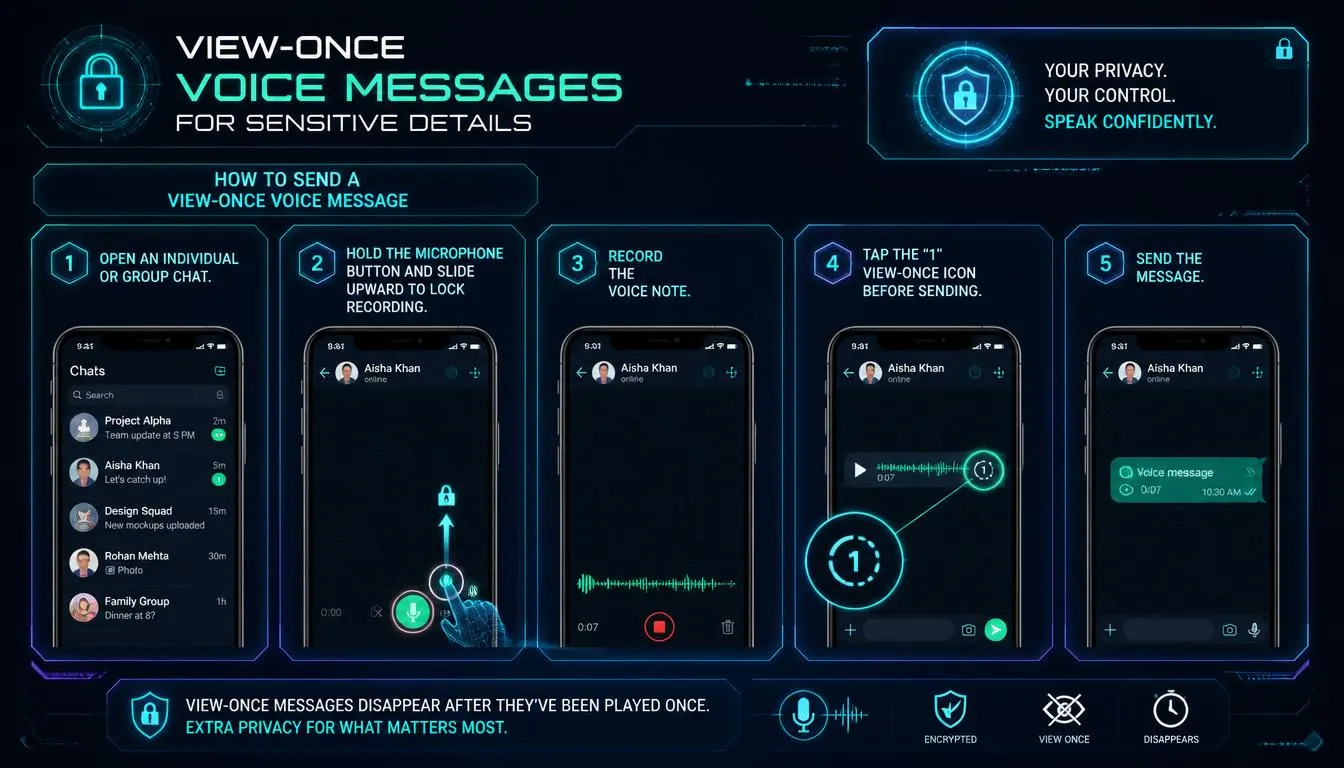
6. Send view-once voice messages for sensitive details
Most WhatsApp users already know the View Once option for photos and videos. The same temporary-sharing concept also applies to voice messages.
A view-once voice message disappears after the recipient listens to it. It can be useful when sharing a short sensitive detail that should not remain in the chat history, such as a gate code, temporary meeting instruction, or private delivery information.
How to send a view-once voice message
-
Open an individual or group chat.
-
Hold the microphone button and slide upward to lock recording.
-
Record the voice note.
-
Tap the “1” view-once icon before sending.
-
Send the message.
Remember: disappearing content can improve privacy, but it cannot guarantee complete secrecy. A recipient could still record the audio using another device or repeat its contents to another person. Do not send passwords, bank PINs, card details, or other high-risk financial information by voice note.
7. Silence spam calls from unknown numbers
Spam and scam calls can be a serious problem. Unknown numbers may call repeatedly with fake job offers, prize claims, investment pitches, impersonation attempts, or unwanted promotions.
The Silence Unknown Callers setting stops calls from numbers not saved in your contacts from ringing your phone. The calls remain visible in your WhatsApp call list, so you can review them later if needed.
How to silence unknown callers
-
Go to Settings.
-
Select Privacy.
-
Tap Calls.
-
Turn on Silence Unknown Callers.
This feature is designed to help screen spam, scams, and unknown callers without blocking them automatically. WhatsApp confirms that silenced calls will still appear in the Calls tab.
Final thoughts
The best WhatsApp hidden features Pakistani users can use in 2026 are not only about convenience. They give you more control over privacy, data use, media quality, unwanted calls, and your time.
Start with the features that solve your daily problem. Turn on voice transcripts if you receive too many long audios, use HD quality if you share important images, enable Silence Unknown Callers if spam is disturbing you, and use Chat Lock with a Secret Code if you share your phone with others.